EDUCATION WITH AI
When the Blackboard Learns to Listen: What an AI Classroom Taught Me About Designing for Teachers
Insights

AI Transforming Pedagogy
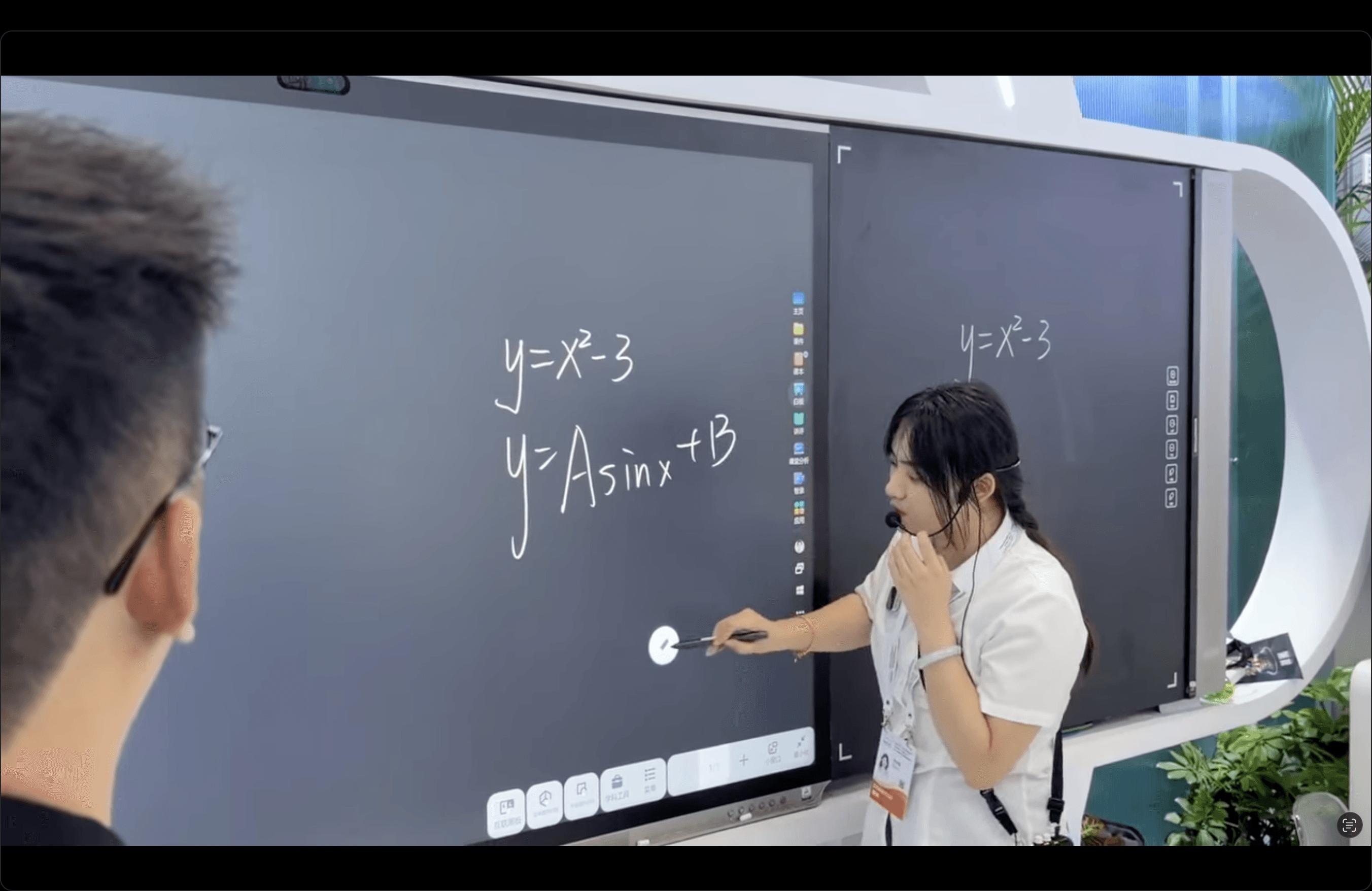
At this year's World Artificial Intelligence Conference in Shanghai, iFLYTEK showed off something that made me pause. An AI powered blackboard that watches a teacher write a math equation by hand, and within seconds turns it into an interactive graph, a 3D model, or a digitized set of notes the whole class can revisit later.
It is a striking piece of hardware. But as someone who moves between UX design and instructional design, what caught my attention was not the novelty. It was the restraint.
The Real Innovation Is What the Teacher Doesn't Have to Do
Most classroom technology asks the teacher to adapt. Build the slide deck in advance. Learn the new software. Translate your lesson plan into someone else's interface.
This system flips that relationship. The teacher writes an equation the way they always have, and the AI interprets it in the background, generating graphs, 3D geometry, animations, or cleaned up digital notes without asking the teacher to change a single habit. They keep writing, explaining, walking the room, and answering questions. The tool disappears into the workflow instead of sitting on top of it.
That is the part I recognize from my own work. Whether I am designing an onboarding flow or building an eLearning module, the strongest solutions are usually the ones nobody has to be trained to use. The moment a user has to think about the tool instead of the task, you have already lost some of their trust.

Solving the Problem Every Teacher Already Knows
Anyone who has spent time in instructional design knows the core tension. Students learn differently. Some need to read it, some need to see it, some need to move a 3D object with their hands before a concept clicks. Teachers know this too, but they rarely have the time in a 45 minute period to build three versions of the same explanation.
What stood out to me here is that the AI does not replace the explanation. It multiplies it. A geometry proof becomes something students can rotate. A chemical reaction becomes an animation instead of a static diagram on a page. The teacher's original explanation stays intact, and the system just gives it more forms to take.
This is the same principle I lean on when I design learning experiences. Reduce the friction between an idea and the format that makes it click for a specific learner, without adding a new burden on the person delivering it.

Scale Changes the Conversation
iFLYTEK reports this technology is already deployed across more than 60,000 schools in China, reaching over 160 million teachers and students. I cannot independently verify how consistently every classroom uses the full feature set, but the scale alone tells you something important. This is not a pilot program anymore. It is infrastructure.
When AI in education moves from experiment to infrastructure, the design questions get heavier. It is no longer just "does this feature work." It becomes "what happens when this is how a generation of students is taught to learn."

More to Discover


EDUCATION WITH AI
When the Blackboard Learns to Listen: What an AI Classroom Taught Me About Designing for Teachers
Insights
AI Transforming Pedagogy
At this year's World Artificial Intelligence Conference in Shanghai, iFLYTEK showed off something that made me pause. An AI powered blackboard that watches a teacher write a math equation by hand, and within seconds turns it into an interactive graph, a 3D model, or a digitized set of notes the whole class can revisit later.
It is a striking piece of hardware. But as someone who moves between UX design and instructional design, what caught my attention was not the novelty. It was the restraint.
The Real Innovation Is What the Teacher Doesn't Have to Do
Most classroom technology asks the teacher to adapt. Build the slide deck in advance. Learn the new software. Translate your lesson plan into someone else's interface.
This system flips that relationship. The teacher writes an equation the way they always have, and the AI interprets it in the background, generating graphs, 3D geometry, animations, or cleaned up digital notes without asking the teacher to change a single habit. They keep writing, explaining, walking the room, and answering questions. The tool disappears into the workflow instead of sitting on top of it.
That is the part I recognize from my own work. Whether I am designing an onboarding flow or building an eLearning module, the strongest solutions are usually the ones nobody has to be trained to use. The moment a user has to think about the tool instead of the task, you have already lost some of their trust.
Solving the Problem Every Teacher Already Knows
Anyone who has spent time in instructional design knows the core tension. Students learn differently. Some need to read it, some need to see it, some need to move a 3D object with their hands before a concept clicks. Teachers know this too, but they rarely have the time in a 45 minute period to build three versions of the same explanation.
What stood out to me here is that the AI does not replace the explanation. It multiplies it. A geometry proof becomes something students can rotate. A chemical reaction becomes an animation instead of a static diagram on a page. The teacher's original explanation stays intact, and the system just gives it more forms to take.
This is the same principle I lean on when I design learning experiences. Reduce the friction between an idea and the format that makes it click for a specific learner, without adding a new burden on the person delivering it.
Scale Changes the Conversation
iFLYTEK reports this technology is already deployed across more than 60,000 schools in China, reaching over 160 million teachers and students. I cannot independently verify how consistently every classroom uses the full feature set, but the scale alone tells you something important. This is not a pilot program anymore. It is infrastructure.
When AI in education moves from experiment to infrastructure, the design questions get heavier. It is no longer just "does this feature work." It becomes "what happens when this is how a generation of students is taught to learn."
More to Discover
EDUCATION WITH AI
When the Blackboard Learns to Listen: What an AI Classroom Taught Me About Designing for Teachers
Insights
AI Transforming Pedagogy
At this year's World Artificial Intelligence Conference in Shanghai, iFLYTEK showed off something that made me pause. An AI powered blackboard that watches a teacher write a math equation by hand, and within seconds turns it into an interactive graph, a 3D model, or a digitized set of notes the whole class can revisit later.
It is a striking piece of hardware. But as someone who moves between UX design and instructional design, what caught my attention was not the novelty. It was the restraint.
The Real Innovation Is What the Teacher Doesn't Have to Do
Most classroom technology asks the teacher to adapt. Build the slide deck in advance. Learn the new software. Translate your lesson plan into someone else's interface.
This system flips that relationship. The teacher writes an equation the way they always have, and the AI interprets it in the background, generating graphs, 3D geometry, animations, or cleaned up digital notes without asking the teacher to change a single habit. They keep writing, explaining, walking the room, and answering questions. The tool disappears into the workflow instead of sitting on top of it.
That is the part I recognize from my own work. Whether I am designing an onboarding flow or building an eLearning module, the strongest solutions are usually the ones nobody has to be trained to use. The moment a user has to think about the tool instead of the task, you have already lost some of their trust.
Solving the Problem Every Teacher Already Knows
Anyone who has spent time in instructional design knows the core tension. Students learn differently. Some need to read it, some need to see it, some need to move a 3D object with their hands before a concept clicks. Teachers know this too, but they rarely have the time in a 45 minute period to build three versions of the same explanation.
What stood out to me here is that the AI does not replace the explanation. It multiplies it. A geometry proof becomes something students can rotate. A chemical reaction becomes an animation instead of a static diagram on a page. The teacher's original explanation stays intact, and the system just gives it more forms to take.
This is the same principle I lean on when I design learning experiences. Reduce the friction between an idea and the format that makes it click for a specific learner, without adding a new burden on the person delivering it.
Scale Changes the Conversation
iFLYTEK reports this technology is already deployed across more than 60,000 schools in China, reaching over 160 million teachers and students. I cannot independently verify how consistently every classroom uses the full feature set, but the scale alone tells you something important. This is not a pilot program anymore. It is infrastructure.
When AI in education moves from experiment to infrastructure, the design questions get heavier. It is no longer just "does this feature work." It becomes "what happens when this is how a generation of students is taught to learn."